
VPN Hotspot Shield: Proxy VPN
Anchorfree LLCTools
4.585.05K Reviews
- Version
- 11.19.0
- Installs
- 100.00M
- Age Rating
- Everyone
Screenshots
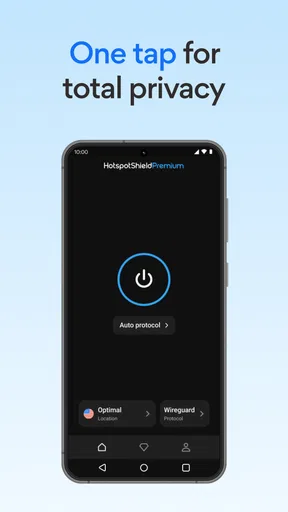
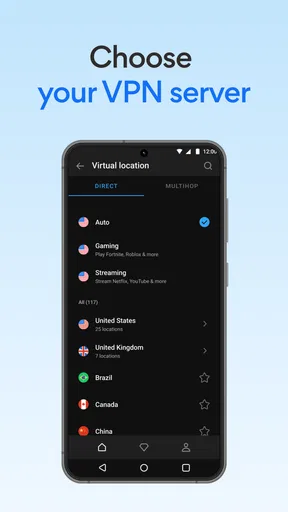
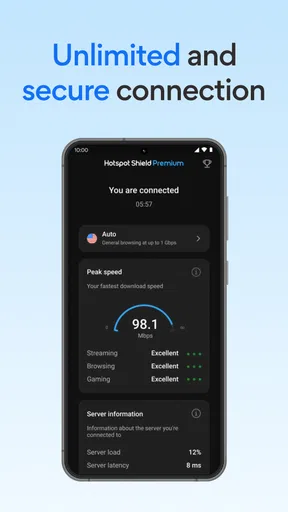
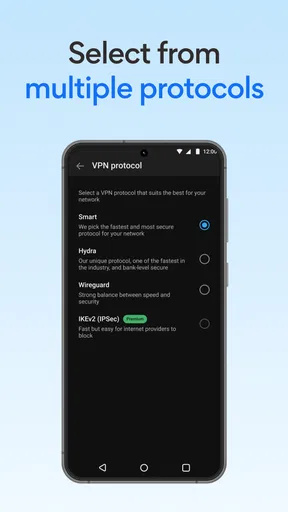
Our Review of VPN Hotspot Shield: Proxy VPN
 Analysis by Appyee
I judge a VPN by how well it fits an ordinary day, not just by how impressive its server count sounds. VPN Hotspot Shield: Proxy VPN is a tools app from Anchorfree LLC, and its appeal is easy to understand: it offers a simple route to a VPN connection without asking newcomers to learn much first. I would consider it when I want a more private connection on the go, but I would not treat a VPN as a cure-all for online safety or assume it will make every site or service work differently.
What you can expect from the free option
The app is free to download, while in-app purchases range from $0.99 to $99.99 per item. That tells me there are optional paid purchases, but it does not tell me which purchase suits a particular person or what every tier includes. I would try the free access first, then check the purchase screen carefully before paying. A price range is not a reason to assume that every feature requires a subscription—or that a paid option is worthwhile for your routine.
That distinction matters because VPN use varies a lot. If I only want to connect occasionally while using public Wi-Fi, free access may be enough to decide whether the app’s controls and connection experience suit me. If I expect to use it throughout the day, I would first work out which functions I actually need and compare their cost with other VPN options. I would not pay simply because I expect a VPN to improve every connection.
First Impressions
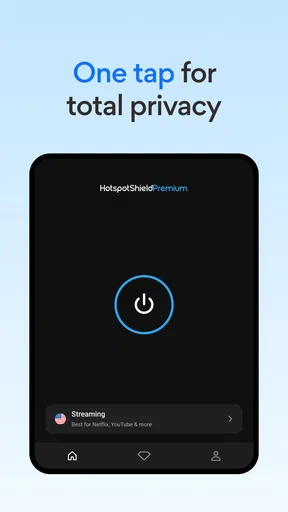
The first thing that strikes you when you open VPN Hotspot Shield: Proxy VPN is its clean and intuitive interface. Even if you’re not tech-savvy, the straightforward design makes navigation a breeze. No need to get lost in endless menus; everything you need is a tap away. It’s like having a personal security guard for your online activities, without the intimidating presence.
Features That Stand Out
Now, onto the juicy bits—what does this app actually offer? Well, plenty! Here’s a breakdown:
- Unlimited Bandwidth: Stream your favorite shows or download files without worrying about data caps. It’s perfect for binge-watching sessions.
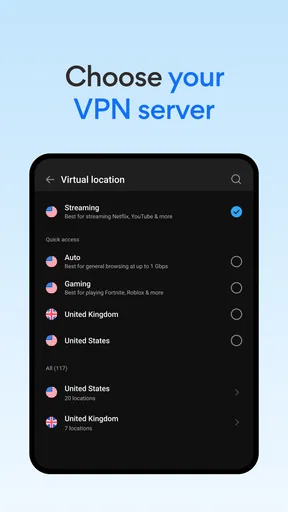
- Global Server Access: With servers in over 80 countries, you can hop around the globe virtually. Access content that’s geo-restricted and feel like a globe-trotter from your couch.
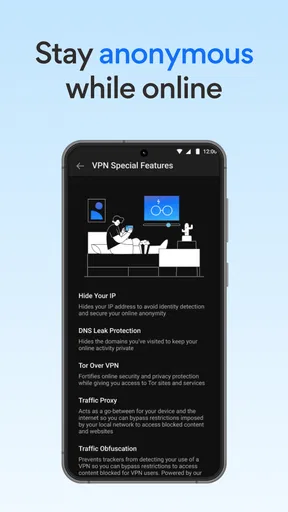
- Military-grade Encryption: This isn’t just buzzword marketing. The AES-256 encryption ensures your data is locked tight, keeping prying eyes at bay.
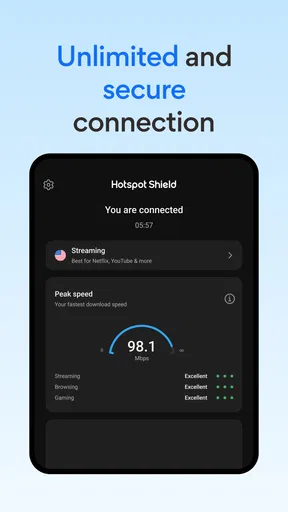
- Fast Connection Speeds: No one likes buffering, and with Hotspot Shield, you’re unlikely to meet that dreaded spinning wheel. The app claims to be one of the fastest VPNs out there, and from my experience, it’s not far off.
How It Performs
Performance-wise, the app is a solid contender. I tested it over several days, switching between servers in the US, UK, and Japan, and I was impressed with the consistency. Streaming Netflix from a UK server was seamless, and I didn’t encounter any significant drops in speed. It’s like having a magic passport to online content.
Security is another strong suit. I ran several leak tests and the app passed with flying colors—no IP or DNS leaks in sight. It’s reassuring to know that your digital footprint is masked, especially on public Wi-Fi networks.
User Experience
One of the app’s highlights is its ease of use. You don’t need to be a tech wizard to get started. Simply download, install, and tap to connect—easy as pie. The app also offers a clear help section, so if you do run into any hiccups, support is just a click away.
Another cool feature is the automatic kill switch. If your VPN connection drops, it cuts off internet access to ensure no data leaks occur. This is a nifty safety net that adds an extra layer of protection.
Room for Improvement
No app is perfect, and VPN Hotspot Shield has its quirks. The free version comes with ads, which can be a bit distracting if you’re using the app frequently. Also, while the app offers a generous list of servers, some locations, especially in remote areas, can be slower during peak times.
Another point to consider is that while the app’s basic version is free, many of the premium features, like access to the fastest servers, require a subscription. It’s not a dealbreaker, but it’s something to keep in mind if you’re looking at long-term use.
Choosing it over other VPN approaches
Compared with a browser’s private-browsing mode, a VPN is a different tool: private browsing mainly affects what the browser retains on the device, while a VPN changes the route your network traffic takes. Neither makes you anonymous to every website, and a VPN does not replace careful account security. I would choose Hotspot Shield for a quick, app-level connection rather than expecting it to erase tracking or protect me from suspicious downloads.
It also sits between two common alternatives: a free VPN with a narrow set of options and a paid service selected for detailed control. The store summary describes access to more than 1,800 secure virtual servers and a speed claim of 2.2 times faster. Those points make the app sound broad in reach, but they do not guarantee that a particular destination will be fast from my location. For a task that depends on a specific country or a steady video call, I would test the route at the time I need it instead of choosing based on a headline claim.
A useful habit is to connect before opening the sensitive app or site, then confirm the VPN indicator is active. If the connection stalls, I would disconnect and retry rather than repeatedly refreshing a page and assuming the protection stayed uninterrupted. For ordinary browsing, the nearest suitable server is often a sensible first choice; switching farther away just to appear in another region can add delay without helping the task.
Where it fits into an ordinary routine
Picture me at a café, checking a travel booking and then signing in to an account while connected to the café’s Wi-Fi. I would turn on the VPN before starting, use the service, and disconnect when I no longer need it if the extra routing slows anything down. That is a practical, limited use: it adds a layer between the device and the local network, but I would still avoid entering sensitive details on a page I do not trust. A VPN cannot make a fraudulent site legitimate.
For someone who moves between home, work, and public networks, the low-friction setup may be more valuable than a long list of advanced controls. For someone who wants to tune protocols, inspect detailed diagnostics, or manage a VPN across several devices from one account, I would compare specialist services before committing. Hotspot Shield’s straightforward approach is a strength for a first connection, but simplicity can also mean less room for people who want to adjust every detail.
One practical question is whether it is a good choice for streaming. It can be useful to try a different virtual location when a service is available in another region, but access can vary and platforms may block VPN traffic. I would not buy a plan solely on the assumption that a particular library will always open. The same caution applies to games: a VPN can change routing, but it may increase latency, so it is not automatically a better option for competitive play.
Who is likely to get value
I see the clearest fit for a newcomer who wants a recognizable on/off workflow, occasional protection on shared Wi-Fi, or a straightforward way to explore VPN connections. The app has an average rating of 4.5 from around 1.6 million ratings, and it has been installed more than 100 million times, which suggests broad adoption rather than proving that it will suit every device or network. It is rated for Everyone, and its long presence in the category makes it a familiar starting point for many people.
It is less compelling if you rarely leave a trusted home network, already have a VPN included in another service, or need highly specific privacy controls. I would also skip it if my main goal were guaranteed access to a particular streaming catalog or the lowest possible gaming latency. In those cases, the VPN’s extra routing may be a nuisance, and the result depends on the service and connection in use.
The current version is 11.15.0, and the app requires Android 8.0 or later. On a device that meets that requirement, I would still consider how often I will use it and whether ads or paid options fit my tolerance. It was released on April 13, 2012, and the developer is Anchorfree LLC; those details provide context, but they do not change the basic decision: install it if its simple workflow matches a real need, not just because VPNs sound reassuring.
Room for Improvement
No app is perfect, and VPN Hotspot Shield has its quirks. The free version comes with ads, which can be a bit distracting if you’re using the app frequently. Also, while the app offers a generous list of servers, some locations, especially in remote areas, can be slower during peak times.
Another point to consider is that while the app’s basic version is free, many of the premium features, like access to the fastest servers, require a subscription. It’s not a dealbreaker, but it’s something to keep in mind if you’re looking at long-term use.
Final Thoughts
All in all, VPN Hotspot Shield: Proxy VPN is a solid choice for anyone looking to enhance their online privacy and access global content. Its user-friendly design, strong security features, and fast connection speeds make it a reliable companion for digital explorers. Whether you’re concerned about privacy or just want to stream your favorite shows from another country, this app has you covered.
While the free version is a great starting point, the premium features offer that extra oomph for power users. So, if you’ve been on the fence about diving into the world of VPNs, give Hotspot Shield a whirl. It might just be the digital shield you’ve been searching for!
My buy-or-skip verdict
I would start with the free option and judge it on the network I actually use: connect, do a short stretch of normal browsing, then see whether pages load comfortably and whether the app is easy to return to later. That small test is more useful than assuming a published speed claim will match every route. If the free experience meets an occasional need, there is no reason to pay just for the sake of upgrading.
If I found myself relying on it daily, I would inspect the in-app purchase choices and decide whether the paid access solves a specific frustration, such as needing a different connection option. With purchases spanning $0.99 to $99.99 per item, the range is broad enough that I would read the exact offer before confirming anything and check whether it is a recurring commitment. The free download makes trying the app accessible; it does not, by itself, establish the value of every paid choice.
My recommendation is therefore conditional rather than automatic. Hotspot Shield makes sense for people who want an approachable VPN and have a clear, modest use for it. I would look elsewhere if I needed fine-grained configuration, predictable access to a specific service, or a guaranteed performance improvement. Use the app as one privacy tool, keep realistic expectations, and pay only when the available option demonstrably fits your routine.
Verdict
Strengths of VPN Hotspot Shield: Proxy VPN
- Fast connection speeds for streaming.
- User-friendly interface for easy navigation.
- Strong encryption ensures privacy.
- Supports multiple devices simultaneously.
- Wide range of server locations globally.
Limitations of VPN Hotspot Shield: Proxy VPN
- Limited features in free version.
- Occasional connection drops reported.
- Ads present in the free version.
- May affect battery life significantly.
- Some servers can be overcrowded.
Similar Picks in This Category
View All
Google LLC4.0

Gboard - the Google Keyboard
Google LLC4.5

Google Play services
Google LLC4.3

Google Play Store
Google LLC4.9

Files by Google
Google LLC4.5

SHAREit: Transfer, Share Files
Smart Media4U Technology Pte.Ltd.4.3
Frequently Asked Questions
What platforms is Hotspot Shield VPN available on?
Hotspot Shield VPN is available on multiple platforms, including Android, iOS, Windows, and macOS. This cross-platform availability ensures you can protect your internet connection whether you're using a smartphone, tablet, or computer. Additionally, it provides browser extensions for Chrome and Firefox, enhancing your online privacy across different devices.
How does Hotspot Shield VPN ensure my online privacy?
Hotspot Shield VPN uses military-grade encryption to secure your internet connection, making it difficult for hackers or third parties to access your data. It also hides your IP address, providing anonymity while browsing. The app has a strict no-logs policy, meaning it doesn't store your browsing activities, ensuring your online privacy is maintained.
Can I use Hotspot Shield VPN to access geo-restricted content?
Yes, Hotspot Shield VPN allows you to bypass geo-restrictions by masking your IP address and providing access to servers in various countries. This feature enables you to access content that might be restricted in your location, such as streaming services or websites, ensuring a broader internet experience.
Is there a free version of Hotspot Shield VPN?
Hotspot Shield offers a basic free version with limited features and bandwidth, suitable for casual browsing. However, for more advanced features like unlimited bandwidth, access to more server locations, and better speed, you can opt for the premium version, which requires a subscription. The premium version enhances your experience significantly.
What should I consider before subscribing to the premium version?
Before subscribing to the premium version of Hotspot Shield VPN, consider your specific needs such as the number of devices you plan to use, required bandwidth, and desired server locations. Evaluate the cost against the features offered, and take advantage of any free trials to determine if the premium service meets your expectations. Understanding these factors will help you make an informed decision.
